Sync frequency
Control how often Whalesync scans each connection for changes. Turn off real-time webhooks and set an interval or cron schedule to cut API calls.
Sync frequency controls how often Whalesync scans a connection for changes. You set it per connection, in your sync's Settings tab under Connections.
Each connection defaults to the fastest frequency supported. You can slow a connection down, which reduces how often Whalesync calls that app's API. This is useful when an app has strict API limits, or when you want to control when changes propagate.
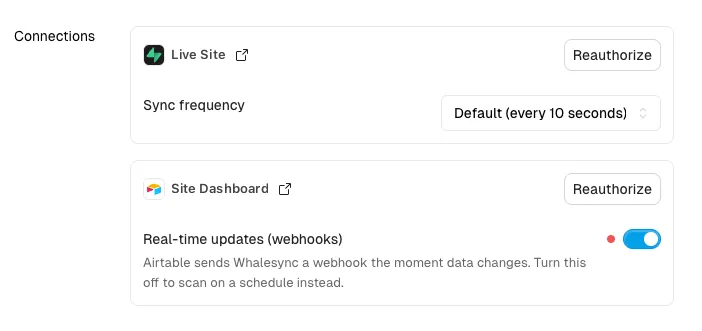
Real-time updates (webhooks)
Section titled “Real-time updates (webhooks)”When an app supports webhooks, it sends Whalesync a notification the moment data changes. Whalesync processes those changes as they arrive, so there's no scan interval to set.
While real-time updates are on, the Sync frequency option is hidden for that connection.
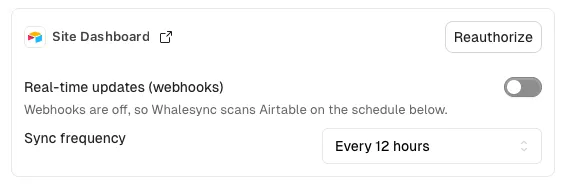
Turn Real-time updates (webhooks) off if you'd rather scan on a schedule. The sync frequency option appears once webhooks are disabled.
Choosing a frequency
Section titled “Choosing a frequency”Two kinds of schedule are available:
- Interval — scan on a fixed cadence, such as every 12 hours.
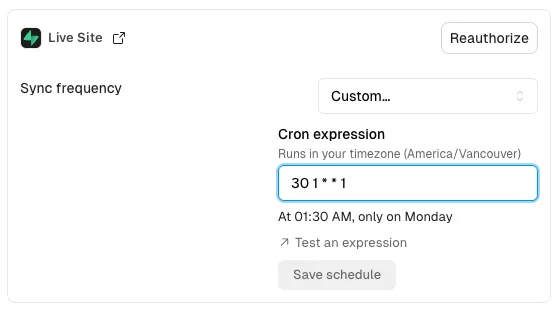
- Custom (cron) — scan on a cron schedule, such as midnight every day. Choose Custom… and enter a cron expression.
Cron expressions run in your account's timezone. Whalesync shows a summary of the expression you entered so you can confirm it's what you meant.
You can set a connection to scan less often than the default, but not more often.