> For the complete documentation index, see [llms.txt](https://docs.whalesync.com/llms.txt). Markdown versions of documentation pages are available by appending `.md` to page URLs; this page is available as [Markdown](https://docs.whalesync.com/previous-connectors/bubble.md).
# Bubble
Whalesync no longer offers the Bubble connector, but existing syncs keep running. Notes on Bubble's API pricing, supported fields, and sync behavior.
> [!WARNING]
> **Archived:** This connector is no longer offered by Whalesync. Existing syncs will continue to run, but future improvements and support will be limited. See [Previous Connectors](https://docs.whalesync.com/previous-connectors.md) for more details.
## Bubble
### Bubble API Changes
> [!WARNING]
> On April 6, 2023, Bubble [announced](https://bubble.io/blog/2023-pricing-updates/) pricing changes that affected their API, and on October 1, 2024, they migrated all users to new API pricing.
>
> Due to Bubble's API limitations, **Whalesync will be slower to sync changes out of Bubble** and you will likely need to upgrade your Bubble plan to continue using Whalesync.
>
> Whalesync uses polling to observe changes to records, which uses Bubble's "workload units". Bubble does not support webhooks which would reduce the need for polling. We are working with the Bubble team to find a good solution, but in the meantime, please be aware that Whalesync may use a significant amount of your workload units depending on your Bubble subscription.
### Supported Fields
| Field | Status |
|---|
| 🖇️ Composite types | ✅ Supported |
| 🧑 Created by | ➡️ Supported (1-Way) |
| 🕠 Created date | ➡️ Supported (1-Way) |
| 📅 Date | ✅ Supported |
| 📅 Date interval | ✖️ Not Yet |
| 📅 Date range | ✖️ Not Yet |
| 📍Geographic address | ✖️ Not Yet |
| 📂 Image/file | ✅ Supported |
| 🕠 Modified date | ➡️ Supported (1-Way) |
| #️⃣ Number | ✅ Supported |
| #️⃣ Number interval | ✖️ Not Yet |
| 📝 Slug | ➡️ Supported (1-Way) |
| 📝 Text | ✅ Supported |
| 🫂 User | ✅ Supported |
| ☑️ Yes/no | ✅ Supported |
### Things to Keep in Mind
> [!WARNING]
> **Must enable data API**\
> Bubble requires the Data API to be enabled for syncing to work. Follow the instructions below to enable it.
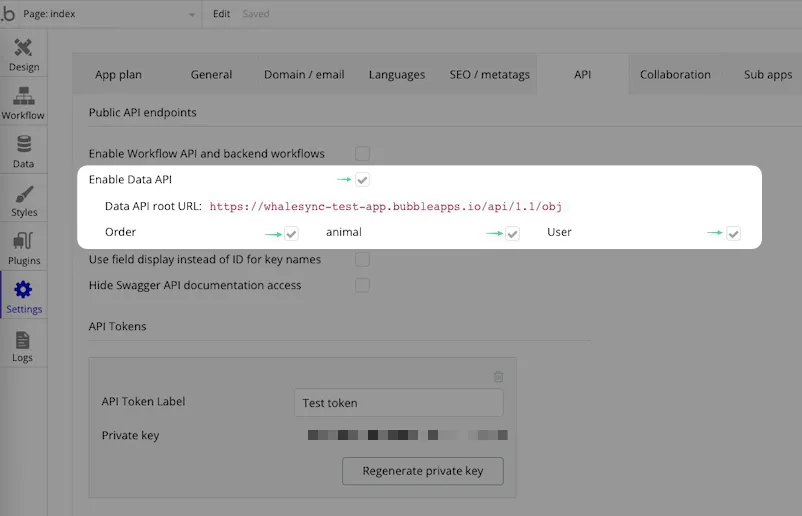
1. Go to Settings > API
2. Check the box for "Enable Data API"
3. Check the box for all tables you plan to sync
> [!CAUTION]
> **Renaming schema, tables, or columns will break Whalesync mappings**\
> If you rename a table or column, you'll need to remap the impacted table/column in Whalesync. Note - remapping an impacted table will lead to duplicates unless you reset your data as well.
>
> If you need to rename a table in Bubble, we suggest making sure that every record has a unique identifier that can be matched on, then turn off the old sync and set up a new sync with [record-matching.md](https://docs.whalesync.com/features/record-matching.md "mention").
> [!NOTE]
> **The email field for User "things" has a record sync delay if syncing with Airtable**\
> Bubble has a special data table called User that they treat differently than other tables. Specifically, you need to send it a valid email address. When syncing Bubble with Airtable, this can cause problems since Airtable saves every keystroke.\
> \
> To avoid this issue, Whalesync defaults to a 10-second record sync delay. See [record sync delay](https://docs.whalesync.com/features/additional-features/delay-before-syncing.md) for more details.