Selective row-level sync
Pause syncing for individual records with a checkbox or boolean control field, using the Selective row-level sync setting in a table's Advanced settings.
Overview
Section titled “Overview”Selective row-level sync lets you pause syncing for individual records without turning off your whole sync. Add a checkbox field (e.g., "Sync Enabled") in the source app you want to control from. When the box is unchecked, Whalesync will not sync that record. Re-check it and Whalesync will resume syncing the record.
How to enable selective row-level sync
Section titled “How to enable selective row-level sync”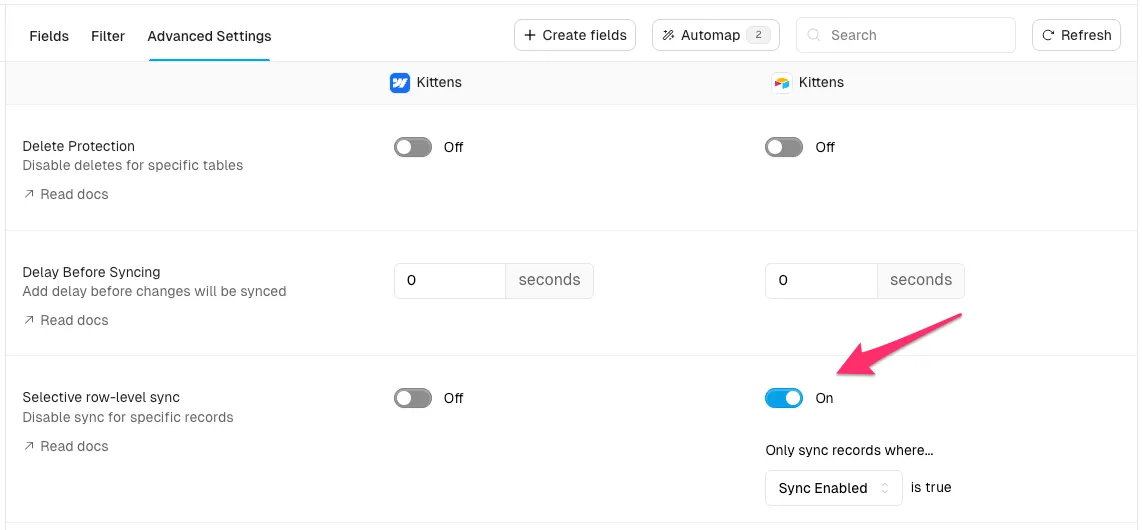
- Open your sync
- Select the desired table
- Open the Advanced settings tab
- Enable the "Selective row-level sync" toggle for the app you want to control from
- Choose the field that you want to use to control syncing. Only compatible fields will be available.
- Save changes
How it works
Section titled “How it works”- When the control field is checked, the record syncs normally.
- When the control field is unchecked, syncing is paused for that record.
- While paused, changes from either app are ignored for that record.
- When re-enabled, Whalesync resumes syncing the record.
Compatible fields {#compatible_columns}
Section titled “Compatible fields {#compatible_columns}”Only checkbox or boolean fields are eligible to use to control row-level syncing.
Examples by app:
- Airtable: Checkbox
- Notion: Checkbox
- Webflow: Switch
- Postgres & Supabase: boolean
- Google Sheets: boolean
Behavior details
Section titled “Behavior details”- Paused means Whalesync detects the change but purposefully ignores it for that record.
- The pause applies bi-directionally: edits in either connected app will not sync while paused.
- Re-enabling resumes normal behavior. If both sides changed while paused, the most recent changes win (per Whalesync's versioning).
- The sync overview can display how many records are currently paused in a table.
Do I need to map the control field to the other app?
Section titled “Do I need to map the control field to the other app?”No. The control field should only exist on the side you want to control from and should not be mapped.
What happens if I edit a paused record on the other app?
Section titled “What happens if I edit a paused record on the other app?”Changes are ignored while paused. When you re-enable syncing, edits made in either app will sync. If the same field was edited in both apps, the most recent change wins.
Will the records still count toward my record limit if they are paused?
Section titled “Will the records still count toward my record limit if they are paused?”Yes. Selective row-level sync pauses an individual record, not the whole sync — the sync is still active, so the record still counts toward your record limit. (Pausing or deleting an entire sync is what changes your count — see How record limits work.)
Can I use filters with selective row-level sync?
Section titled “Can I use filters with selective row-level sync?”Yes. Table filters and selective row-level sync are additive. If a record is filtered out, it will not sync regardless of the control field.
Does this replace using a "Draft" status in my CMS?
Section titled “Does this replace using a "Draft" status in my CMS?”No. Draft status may hide content on your site. Selective row-level sync simply pauses syncing, so your live content can remain published while you edit.