Multiple data sources
Fix the Notion error "Databases with multiple data sources are not supported" by creating a new sync or moving extra data sources out of the database.
Databases with multiple data sources are not supported in this API version.
Section titled “Databases with multiple data sources are not supported in this API version.”On September 3, 2025, Notion updated their API to allow multiple data sources per database. A data source is a set of pages in a database — so a single database can now contain several independent collections of pages.
Whalesync fully supports multiple data sources on all newly created syncs. However, this change is not backward-compatible with syncs that were created before the update.
If you're seeing the error above, you have two options:
Option 1: Create a new sync
Section titled “Option 1: Create a new sync”Create a new sync in Whalesync. New syncs use the latest Notion API version and support multiple data sources out of the box.
Option 2: Remove extra data sources in Notion
Section titled “Option 2: Remove extra data sources in Notion”If you'd prefer to keep your existing sync, you can remove any additional data sources from the Notion database so that it only contains a single data source.
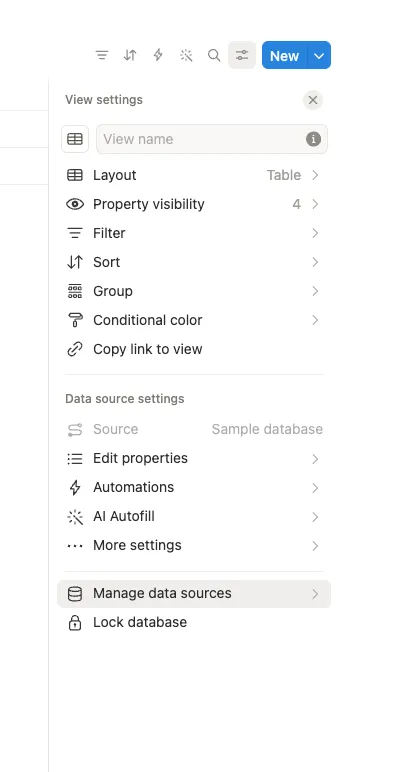
To do this, open the database's view settings and click Manage data sources:
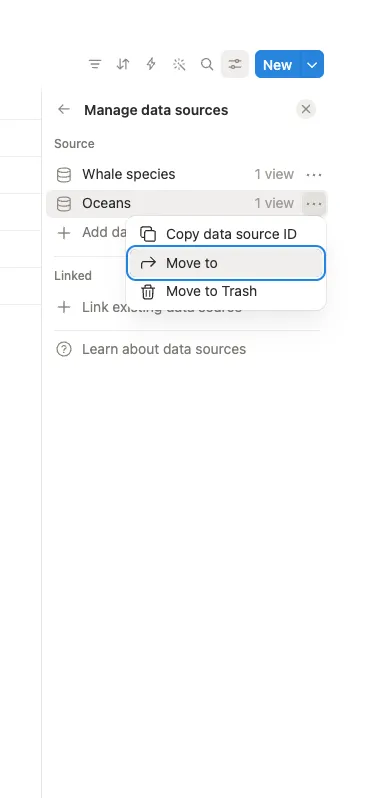
Then click the ••• menu next to the extra data source and choose Move to to relocate it to another database: