WordPress.org
Two-way sync WordPress posts, pages, custom posts, categories, and tags with Airtable, Notion, Google Sheets, and more. Covers versions, hosts, and fields.
Supported Versions
Section titled “Supported Versions”Whalesync requires Wordpress version 5.6 or greater.
Supported Hosting Platforms
Section titled “Supported Hosting Platforms”Whalesync has been tested against the following Wordpress hosting platforms:
Recommended Settings
Section titled “Recommended Settings”- We recommend that the user you generate the Application Password from for Whalesync has the role "Administrator". The minimum required role is "Editor".
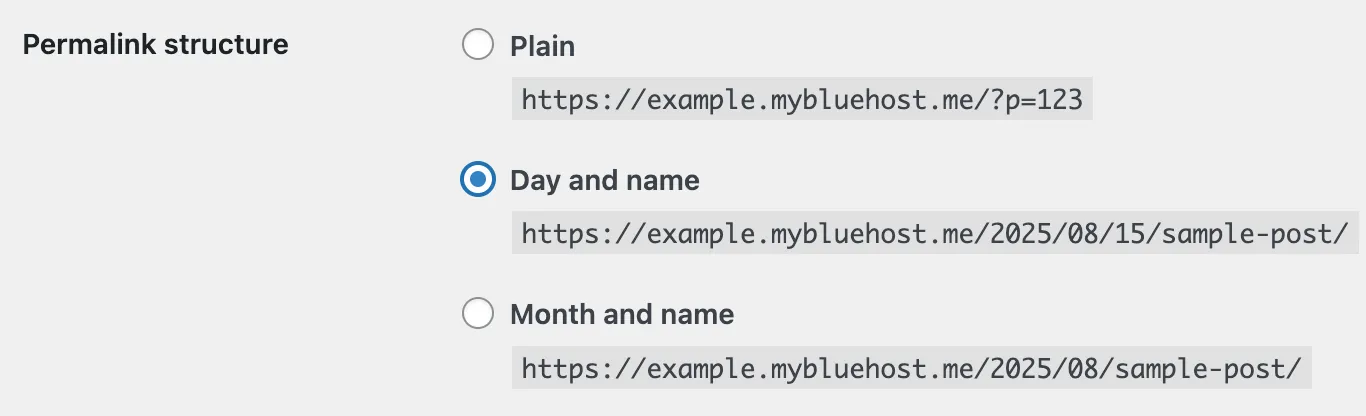
- We recommend making sure your Wordpress Permalinks are not set to "Plain":
Supported Types
Section titled “Supported Types”| Field | Status |
|---|---|
| Posts | ✅ Supported |
| Custom Posts | ✅ Supported |
| Pages | ✅ Supported |
| Categories | ✅ Supported |
| Media | ✖️ Not Yet |
| Tags | ✅ Supported |
| Users | ✖️ Not Yet |
The Media table can't be mapped, but images you sync into Featured Media and image fields upload to your WordPress Media Library automatically. See How to sync images and Supporting tables.
Supported Fields
Section titled “Supported Fields”| Field | Status |
|---|---|
| 🔽 Categories | ✅ Supported |
| ☑️ Content | ✅ Supported |
| 🗃️ Custom Fields | ✅ Supported |
| 📂 Excerpt | ✅ Supported |
| 🖼️ Featured Media | ✅ Supported |
| 🗃️ Format | ✅ Supported |
| 🔗 Link | ✅ Supported |
| 🕠 Published Date | ✅ Supported |
| 🔗 Slug | ✅ Supported |
| 🗃️ Status | ✅ Supported |
| 🔝 Sticky | ✅ Supported |
| 🏷️ Tag | ✅ Supported |
| 📄 Title | ✅ Supported |
| 🫂 Author | ✖️ Not Yet |
Supported Blocks for Content
Section titled “Supported Blocks for Content”| Block | Status |
|---|---|
| 🎧 Audio | ✅ Supported |
| 📍 Bullet List | ✅ Supported |
| ⌨️ Code | ✅ Supported |
| 🖼️ Gallery | ✅ Supported |
| 📄 Heading (1-6) | ✅ Supported |
| 🖼️ Image | ✅ Supported |
| 📂 Media & Text | ✅ Supported |
| #️⃣ Numbered List | ✅ Supported |
| 💬 Quote | ✅ Supported |
| 📄 Verse | ✅ Supported |
| 📹 Video | ✅ Supported |
| 🏛️ Classic | ✖️ Not Yet |
| 🖼️ Cover | ✖️ Not Yet |
| 📂 File | ✖️ Not Yet |
| ⏩ Preformatted | ✖️ Not Yet |
| 💬 Pullquote | ✖️ Not Yet |
| 📑 Table | ✖️ Not Yet |
| 🎹 Shortcode | ✖️ Not Yet |
WordPress Multisite
Section titled “WordPress Multisite”Whalesync supports WordPress Multisite installations. Each site in your network is treated as its own independent instance, so you need to create one base per site you want to sync.
The URL you provide when connecting determines which site Whalesync will sync with:
| Site | URL Example |
|---|---|
| Main site | https://whalesync-wp.com/ |
| Subsite | https://whalesync-wp.com/sub-site-1/ |
If you want to sync multiple sites in your network, create a separate base for each one using the appropriate URL.