# How to Create Products & Variants

{% hint style="warning" %}
**Archived:** This connector is no longer offered by Whalesync. Existing syncs will continue to run, but future improvements and support will be limited. See [Previous Connectors](/previous-connectors.md) for more details.
{% endhint %}

## How to Create Products & Variants

### Creating Products

**TL;DR**

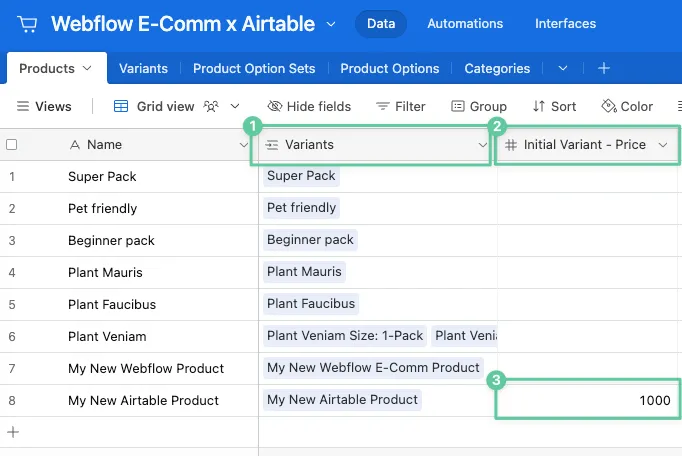
1. Make sure to map a linked record field between the Products table and the Variants table
2. Make sure to map an "Initial Variant - Price" field in your Products table
3. Make sure that "Initial Variant - Price" field has a value
<figure><img src="/files/XPvXrc17EivkCIoC8qEf" alt=""><figcaption></figcaption></figure>

{% hint style="info" %}
Note! Due to a limitation in Webflow's API, **products created in Airtable will sync as "staged for publish"** rather than "published".

You will **need to republish Webflow** (or each product individually) for them to appear on your live site.
{% endhint %}

**Detailed Explanation**

To create a new product, Webflow requires that you create the first variant at the same time. Most of the fields in the variant can be supplied later, but the price must be set immediately by providing a value to the "Initial Variant - Price" field.

{% hint style="info" %}
**Tip!**\
Many other variant properties can also be set when a product is first created by mapping the other "Initial Variant" fields.
{% endhint %}

See video below (starting at 4:47) for an overview of creating products with initial variants.
{% embed url="<https://www.youtube.com/watch?v=OcViUBYHcjE&t=287s>" %}

### Creating Variants

{% hint style="info" %}
Currently, Whalesync does not support creating variants for a product.
{% endhint %}

If you need to create variants for a product, you can create them in the Webflow E-Comm UI and they will sync back into your other connected app.


---

# Agent Instructions: Querying This Documentation

If you need additional information that is not directly available in this page, you can query the documentation dynamically by asking a question.

Perform an HTTP GET request on the current page URL with the `ask` query parameter:

```
GET https://docs.whalesync.com/previous-connectors/webflow-e-commerce/how-to-create-products-and-variants.md?ask=<question>
```

The question should be specific, self-contained, and written in natural language.
The response will contain a direct answer to the question and relevant excerpts and sources from the documentation.

Use this mechanism when the answer is not explicitly present in the current page, you need clarification or additional context, or you want to retrieve related documentation sections.
