# Webflow E-Commerce

{% hint style="warning" %}
**Archived:** This connector is no longer offered by Whalesync. Existing syncs will continue to run, but future improvements and support will be limited. See [Previous Connectors](https://docs.whalesync.com/previous-connectors) for more details.
{% endhint %}

## Webflow E-Commerce

### Supported Collections

<table><thead><tr><th>Field</th><th>Status<select><option value="6c90dea3d4b34f409e73be79b7076c4a" label="✖️ Not Yet" color="blue"></option><option value="9e01356060cc4ea4988d69f72fe19d39" label="✅ Supported" color="blue"></option><option value="bd4357bee12749d0b80f7bc4a94ec3b5" label="➡️ Supported (1-Way)" color="blue"></option></select></th><th data-hidden></th></tr></thead><tbody><tr><td>📦 Products</td><td><span data-option="9e01356060cc4ea4988d69f72fe19d39">✅ Supported</span></td><td></td></tr><tr><td>#️ Variants</td><td><span data-option="9e01356060cc4ea4988d69f72fe19d39">✅ Supported</span></td><td></td></tr><tr><td>🔽 Categories</td><td><span data-option="9e01356060cc4ea4988d69f72fe19d39">✅ Supported</span></td><td></td></tr><tr><td>🎨 Product Options</td><td><span data-option="9e01356060cc4ea4988d69f72fe19d39">✅ Supported</span></td><td></td></tr><tr><td>📂 Product Option Sets</td><td><span data-option="9e01356060cc4ea4988d69f72fe19d39">✅ Supported</span></td><td></td></tr><tr><td>🏷️ Discounts</td><td><span data-option="6c90dea3d4b34f409e73be79b7076c4a">✖️ Not Yet</span></td><td></td></tr><tr><td>🔢 Inventory</td><td><span data-option="6c90dea3d4b34f409e73be79b7076c4a">✖️ Not Yet</span></td><td></td></tr><tr><td>💸 Orders</td><td><span data-option="6c90dea3d4b34f409e73be79b7076c4a">✖️ Not Yet</span></td><td></td></tr><tr><td>💸 Subscriptions</td><td><span data-option="6c90dea3d4b34f409e73be79b7076c4a">✖️ Not Yet</span></td><td></td></tr></tbody></table>

### How to Set Up Webflow E-Comm <a href="#h_bccce14d8a" id="h_bccce14d8a"></a>

{% embed url="<https://www.youtube.com/watch?v=OcViUBYHcjE>" %}

### E-Commerce Specific Things to Keep in Mind <a href="#h_bccce14d8a" id="h_bccce14d8a"></a>

{% hint style="info" %}
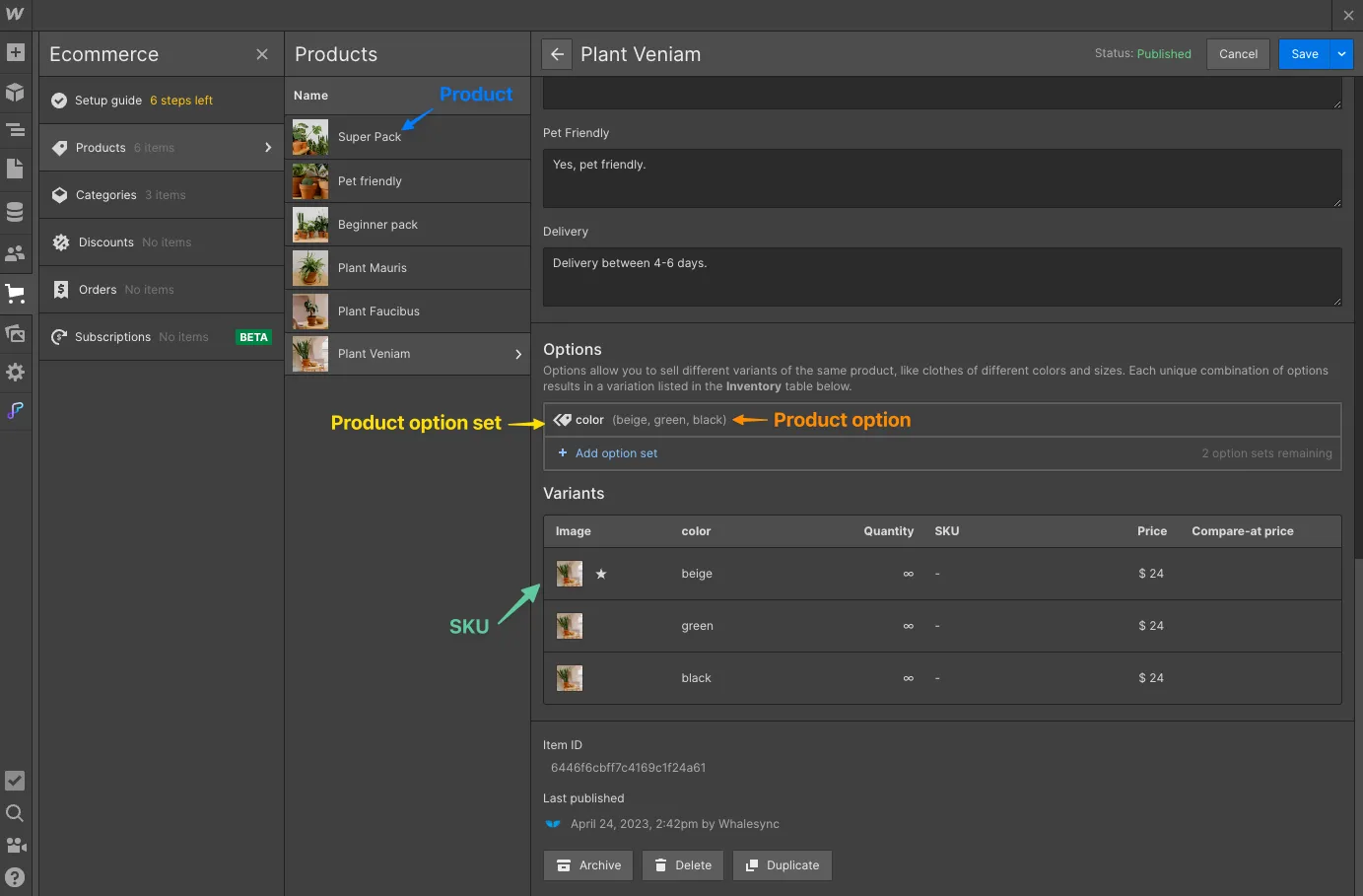
**The "Products" collection in Webflow is split into four tables:**\
1\. Products\
2\. Variants\
3\. Product Option Sets\
4\. Product Options
{% endhint %}

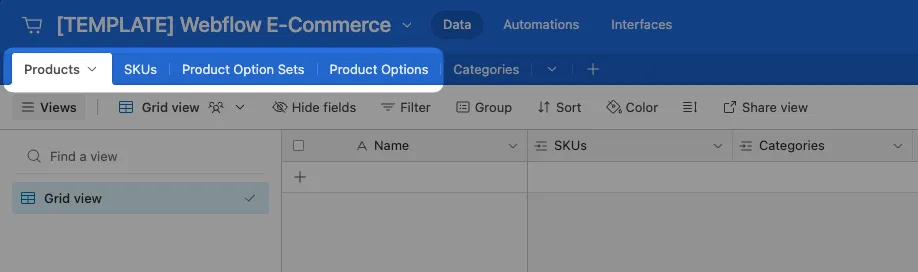
Webflow E-Commerce's "Products" table is really a series of small tables. When managing Webflow E-Comm products from other apps (e.g. Airtable), you'll need to sync Products as the four separate tables below:
<figure><img src="https://2481481593-files.gitbook.io/~/files/v0/b/gitbook-x-prod.appspot.com/o/spaces%2FtLaMDbvbGOow76E8CnqW%2Fuploads%2Fhj11Cu2fUNtTBdiVB6ID%2FCleanShot%202023-04-25%20at%2018.32.48.png?alt=media&#x26;token=1009b037-e440-47ab-b195-5a0a53d8da0a" alt=""><figcaption></figcaption></figure>

<figure><img src="https://2481481593-files.gitbook.io/~/files/v0/b/gitbook-x-prod.appspot.com/o/spaces%2FtLaMDbvbGOow76E8CnqW%2Fuploads%2FxMp7lc9R5lQEq0IEeAaR%2FCleanShot%202023-04-25%20at%2018.31.49.png?alt=media&#x26;token=33606d6f-b691-435a-b2d3-8c9171035206" alt=""><figcaption></figcaption></figure>

{% hint style="info" %}
**You can edit Variants, Production Option Set, and Product Options in your other connector (e.g. Airtable) but you can't create new ones**
{% endhint %}

You can’t currently create new Variants, Product Option Sets, or Product Options in your other connector (e.g. Airtable). If you try to create them, they won’t sync across).

You *can* create new Products though.

{% hint style="info" %}
**Products created in Airtable will sync to Webflow as "staged for publish"**
{% endhint %}

Due to a limitation in Webflow's API, products created in Airtable will sync as "staged for publis&#x68;**"** rather than "published".

You will need to republish Webflow (or each product individually) for them to appear on your live site.

{% hint style="info" %}
**Webflow forces you to recreate variants if you delete Product Options or Option Sets**
{% endhint %}

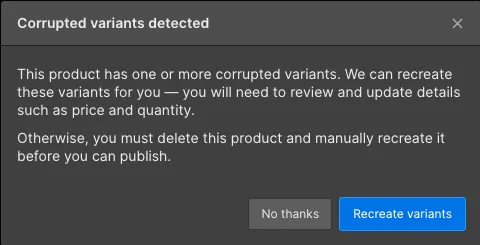
After you delete Product Options (or Option Sets), Webflow will want to correspondingly adjust the set of variantss the next time you log in and open your Product in the Webflow Products table. It will give you a scarier-than-it-needs-to-be message saying that the variantss are corrupted, and offer to fix them. Click “Recreate variants”. As the message says, make sure the fields are set correctly after.
<figure><img src="https://2481481593-files.gitbook.io/~/files/v0/b/gitbook-x-prod.appspot.com/o/spaces%2FtLaMDbvbGOow76E8CnqW%2Fuploads%2FEPwbuLR7WDCESTVmFtCE%2FUntitled.png?alt=media&#x26;token=a32760a8-8883-4d58-86ec-f121e111748f" alt=""><figcaption></figcaption></figure>

### General Webflow - Things to Keep in Mind <a href="#h_bccce14d8a" id="h_bccce14d8a"></a>

See the "Things to Keep in Mind" section for Webflow:

{% embed url="<https://docs.whalesync.com/connectors/webflow#h_bccce14d8a>" %}