# Quick Start Guide: WF E-Comm

{% hint style="warning" %}
**Archived:** This connector is no longer offered by Whalesync. Existing syncs will continue to run, but future improvements and support will be limited. See [Previous Connectors](/previous-connectors.md) for more details.
{% endhint %}

## Quick Start Guide: WF E-Comm

#### 1) Start with our template

If syncing Webflow E-Comm with Airtable, we highly recommend starting with our Airtable template:

{% embed url="<https://airtable.com/shr6kzSL2IJ0tg1w3>" %}
Click "Copy base" on the bottom right
{% endembed %}

#### 2) (If not using the template) Make sure to add important tables

You should have at least these five tables:
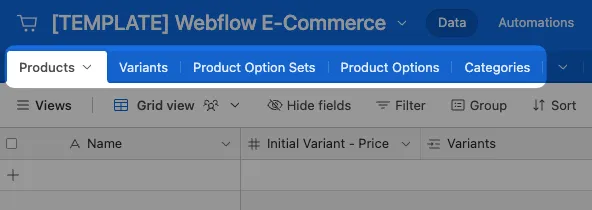
<figure><img src="/files/1LBChva09rM3lac0ADxG" alt=""><figcaption></figcaption></figure>

{% hint style="danger" %}
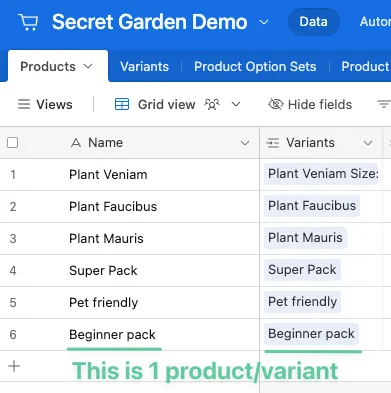
**The Variants table is necessary even if your products don't have variants**

Every product in Webflow has a "variant" even though Webflow doesn't show it.\
\
The Variant record of a Product stores important product information like price.
{% endhint %}

<figure><img src="/files/hRZ7d17kl2tRWHRF4T09" alt=""><figcaption><p>Example where a Webflow product doesn't "have variants" but really does under the hood</p></figcaption></figure>

#### 3) (If not using the template) Make sure to add an "Initial Variant - Price"

You will need to have an "Initial Variant - Price" field in your Products table.

See the below doc to understand why this field is necessary:

{% content-ref url="/pages/XEBPPzooFM7498CSt7Rc" %}
[How to Create Products & Variants](/previous-connectors/webflow-e-commerce/how-to-create-products-and-variants.md)
{% endcontent-ref %}

#### 4) Read the 'Things to Keep in Mind'

The 'Things to Keep in Mind' section of the doc below walks through concepts that are important to Webflow E-Commerce.

{% content-ref url="/pages/2ht1FXPgpqerPDDg6xrq" %}
[Webflow E-Commerce](/previous-connectors/webflow-e-commerce.md)
{% endcontent-ref %}

#### 5) Join our Slack channel

If you have any questions, don't hesitate to ask! We love to help :relaxed:.

{% embed url="<https://join.slack.com/t/whalesyncpioneers/shared_invite/zt-r231pg5t-L7GRWvn52GZGm11GbiXX3Q>" %}


---

# Agent Instructions: Querying This Documentation

If you need additional information that is not directly available in this page, you can query the documentation dynamically by asking a question.

Perform an HTTP GET request on the current page URL with the `ask` query parameter:

```
GET https://docs.whalesync.com/previous-connectors/webflow-e-commerce/quick-start-guide-wf-e-comm.md?ask=<question>
```

The question should be specific, self-contained, and written in natural language.
The response will contain a direct answer to the question and relevant excerpts and sources from the documentation.

Use this mechanism when the answer is not explicitly present in the current page, you need clarification or additional context, or you want to retrieve related documentation sections.